Example of using fnpcell to build class
Example1: bend_bezier.py
Full script
from functools import cached_property
from typing import Sequence, Tuple
from fnpcell import all as fp
from gpdk.technology import get_technology
class BendBezier(fp.IWaveguideLike, fp.PCell):
"""
Attributes:
start: start point of bezier curve
controls: control points of bezier, 1 for Quadratic Bezier, 2 for Cubic Bezier, ...
end: end point of bezier curve
waveguide_type: type of waveguide of the bend
port_names: defaults to ["op_0", "op_1"]
Examples:
```python
TECH = get_technology()
bend = BendBezier(name="q", start=(0, 0), controls=[(31, 30)], end=(60, 0), waveguide_type=TECH.WG.FWG.C.WIRE)
fp.plot(bend)
```

"""
start: fp.Point2D = fp.PositionParam(default=(0, 0), doc="position where bend start, eg. (x, y)")
controls: Sequence[fp.Point2D] = fp.PointsParam(default=[(10, 0)], min_count=1, doc="control points, count >= 1, eg. [(x1, y1), (x2, y2)]")
end: fp.Point2D = fp.PositionParam(default=(10, 10), doc="position where bend end, eg. (x, y)")
waveguide_type: fp.IWaveguideType = fp.WaveguideTypeParam(doc="Waveguide parameters")
port_names: fp.IPortOptions = fp.PortOptionsParam(count=2, default=["op_0", "op_1"])
def _default_waveguide_type(self):
return get_technology().WG.FWG.C.WIRE
@cached_property
def raw_curve(self):
return fp.g.Bezier(
start=self.start,
controls=self.controls,
end=self.end,
)
def build(self) -> Tuple[fp.InstanceSet, fp.ElementSet, fp.PortSet]:
insts, elems, ports = super().build()
wg = self.waveguide_type(curve=self.raw_curve).with_ports(self.port_names)
insts += wg
ports += wg.ports
return insts, elems, ports
if __name__ == "__main__":
from pathlib import Path
gds_file = Path(__file__).parent / "local" / Path(__file__).with_suffix(".gds").name
library = fp.Library()
TECH = get_technology()
# =======================================================================
# fmt: off
library += BendBezier(name="bend1", start=(0, 0), controls=[(30, 30)], end=(60, 0), waveguide_type=TECH.WG.FWG.C.WIRE)
library += BendBezier(name="bend2", start=(0, 0), controls=[(50, 20)], end=(60, 0), waveguide_type=TECH.WG.FWG.C.WIRE)
library += BendBezier(name="bend3", start=(0, 0), controls=[(10, 20)], end=(60, 0), waveguide_type=TECH.WG.FWG.C.WIRE)
# fmt: on
# =============================================================
fp.export_gds(library, file=gds_file)
# fp.plot(library)
Section Script Definition
Use
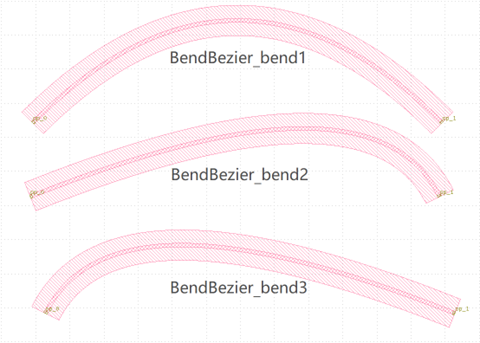
BendBezier()class inbend_bezier.pyto create three layout units, namedbend1,bend2, andbend3, and modify the controls parameter coordinates to different values, as follows:library += BendBezier(name="bend1", start=(0, 0), controls=[(30, 30)], end=(60, 0), waveguide_type=TECH.WG.FWG.C.WIRE) library += BendBezier(name="bend2", start=(0, 0), controls=[(50, 20)], end=(60, 0), waveguide_type=TECH.WG.FWG.C.WIRE) library += BendBezier(name="bend3", start=(0, 0), controls=[(10, 20)], end=(60, 0), waveguide_type=TECH.WG.FWG.C.WIRE)
The units created by the three
BendBezier()classes will generate three layout cells in the GDS file. The starting points of the three bends are in the same position, and the waypoints of the bezier curves will be different depending on the parameter settings.Running the
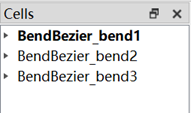
bend_bezier.pyscript will by default generate the GDS file undergpdk>components>bend>local. If the relevant file already exists in the original local folder, the newly generatedbend_bezier.gdsfile will automatically overwrite the original file (no warning message), but you can confirm that the existing file is the newly generated GDS file by the file modification time.Using the GDS file viewer to view the layout (e.g. KLayout), you will see three layout cells in the cell list, all prefixed with
BendBezier_and with the cell names defined when fetching the functions, i.e.bend1,bend2,bend3. To easily compare, create a new cell and import three bends to see the shape of the bend controlled by the parameter.
Example2: bend_circular.py
Full script
from functools import cached_property
from typing import Tuple
from fnpcell import all as fp
from gpdk.technology import get_technology
class BendCircular(fp.IWaveguideLike, fp.PCell):
"""
Attributes:
degrees: central angle of the bend, in degrees
radius: raidus of the bend
waveguide_type: type of waveguide of the bend
port_names: defaults to ["op_0", "op_1"]
Examples:
```python
TECH = get_technology()
bend = BendCircular(name="s", radius=5, waveguide_type=TECH.WG.FWG.C.WIRE)
fp.plot(bend)
```

"""
degrees: float = fp.DegreeParam(default=90, min=-180, max=180, doc="Bend angle in degrees")
radius: float = fp.PositiveFloatParam(default=10, doc="Bend radius")
waveguide_type: fp.IWaveguideType = fp.WaveguideTypeParam(doc="Waveguide parameters")
port_names: fp.IPortOptions = fp.PortOptionsParam(count=2, default=["op_0", "op_1"])
def _default_waveguide_type(self):
return get_technology().WG.FWG.C.WIRE
def __post_pcell_init__(self):
assert fp.is_nonzero(self.degrees)
@cached_property
def raw_curve(self):
return fp.g.EllipticalArc(
radius=self.radius,
final_degrees=self.degrees,
)
def build(self) -> Tuple[fp.InstanceSet, fp.ElementSet, fp.PortSet]:
insts, elems, ports = super().build()
wg = self.waveguide_type(curve=self.raw_curve).with_ports(self.port_names)
insts += wg
ports += wg.ports
return insts, elems, ports
if __name__ == "__main__":
from pathlib import Path
gds_file = Path(__file__).parent / "local" / Path(__file__).with_suffix(".gds").name
library = fp.Library()
TECH = get_technology()
# =======================================================================
# fmt: off
library += BendCircular(name="bend1", radius=5, waveguide_type=TECH.WG.FWG.C.WIRE)
library += BendCircular(name="bend2", radius=10, degrees=30, waveguide_type=TECH.WG.FWG.C.WIRE, transform=fp.translate(0, 5))
library += BendCircular(name="bend3", radius=10, degrees=-60, waveguide_type=TECH.WG.FWG.C.WIRE).translated(5, 5)
library += BendCircular(name="bend4", radius=10, degrees=90, waveguide_type=TECH.WG.FWG.C.WIRE, transform=fp.translate(0, 5)).translated(5, 5)
# fmt: on
# =============================================================
fp.export_gds(library, file=gds_file)
fp.plot(library)
Section Script Definition
In
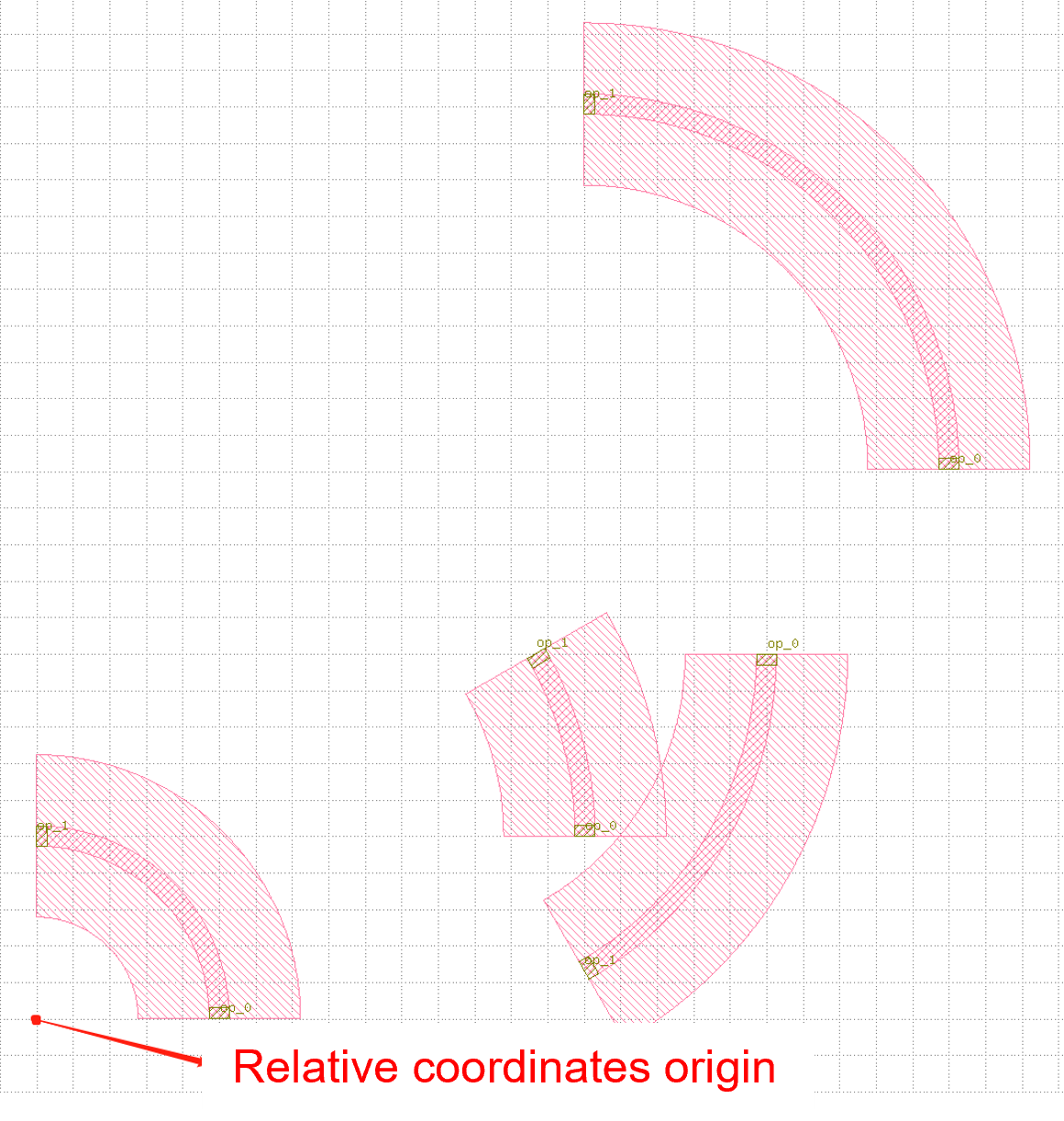
bend_circular.pyscript,BendCircular()class is used to generate four layout cells, namedbend1``~``bend4.Different
radiusparameters,degreesparameters andtranslateparameters are used to reflect their effects on the device, where the use of thetransformparameter is mainly reflected inbend2~bend4, please refer to the comments in the source code for details; examples are shown below:library += BendCircular(name="bend1", radius=5, waveguide_type=TECH.WG.FWG.C.WIRE) library += BendCircular(name="bend2", radius=10, degrees=30, waveguide_type=TECH.WG.FWG.C.WIRE, transform=fp.translate(0, 5)) library += BendCircular(name="bend3", radius=10, degrees=-60, waveguide_type=TECH.WG.FWG.C.WIRE).translated(5, 5) library += BendCircular(name="bend4", radius=10, degrees=90, waveguide_type=TECH.WG.FWG.C.WIRE, transform=fp.translate(0, 5)).translated(5, 5)
Run the
bend_circular.pyscript will, by default, generate the GDS file undergpdk>components>bend>local.Open the GDS file to view the layout, there are four layout cells in the cell list, and they are all prefixed with
BendCircularand suffixed with the cell names defined by the keyword name during creation, i.e.,bend1~bend4.Create a new cell and import the four bends, place the origin of the four bends at the same position, and you can see the effect on the device position due to the the effect of the
fp.translateparameter on the device position.Note that in bend4, when creating the device using the
BendCircular()class, we set translate both inside and outside of it, and its relative position is also the result of superimposing the two translate parameters, as shown below.