Data Compression
In order to reduce the size of the layout file (GDS file) and to use hierarchical design as much as possible to improve development efficiency when viewing the layout and verifying the design, PhotoCAD will compress the data for the same layout pattern when outputting the GDS file.
For example, if you create a device layout cell in a script that defines a and b cells, and if a and b output identical layout graphics, then data compression will automatically be performed when outputting the GDS file, and the data compression will save the latest created cell in the GDS file.
Refer to the source code of gpdk > components > bend > bend_bezier.py and make certain modifications to define multiple instances ( components ) by code when creating devices using the BendBezier class:
if __name__ == "__main__":
    from gpdk.util.path import local_output_file

    gds_file = local_output_file(__file__).with_suffix(".gds")
    library = fp.Library()

    TECH = get_technology()
    # =======================================================================
    # fmt: off

    library += BendBezier(name="q1", start=(0, 0), controls=[(30, 30)], end=(60, 0), waveguide_type=TECH.WG.FWG.C.WIRE)
    library += BendBezier(name="c1", start=(0, 0), controls=[(-10, 30), (70, 30)], end=(60, 0), waveguide_type=TECH.WG.FWG.C.WIRE, transform=fp.translate(0, 40))
    library += BendBezier(name="q2", start=(0, 0), controls=[(30, 30)], end=(60, 0), waveguide_type=TECH.WG.FWG.C.WIRE)
    library += BendBezier(name="c2", start=(0, 0), controls=[(-10, 30), (70, 30)], end=(60, 0), waveguide_type=TECH.WG.FWG.C.WIRE, transform=fp.translate(0, 40))


    # fmt: on
    # =============================================================
    fp.export_gds(library, file=gds_file)
    # fp.plot(library)
As the code shows, 4 instances are defined: q1, c1, q2, c2. where q1 and q2 instances have different names but other parameters are exactly the same, so do c1 and c2.
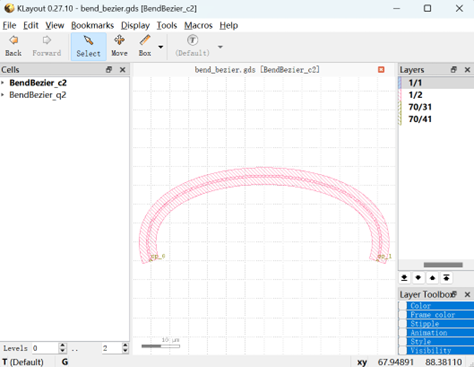
Run the script and check in the layout tool, you can see c2 and q2 in the cell list, however you can’t see q1 and c1, thinking that c1 and c2 generate exactly the same graphics, and c2 is the latest defined instance, similarly q2 and q1 generate exactly the same graphics, and q2 is the latest defined instance.
As a result, when exporting the GDS file, use c2 instead of c1 and q2 instead of q1 by data compression.