Taper
This section will introduce customizing the basic components in gpdk from the beginning, using TaperLinear as an example. The full script can be found in gpdk > components > taper > taper_linear.py.
Full script
from functools import cached_property
from typing import Tuple
from fnpcell import all as fp
from gpdk.technology import get_technology
from gpdk.technology.interfaces import CoreCladdingWaveguideType
from gpdk.routing.extended.extended import Extended
class TaperLinear(fp.IWaveguideLike, fp.PCell):
"""
Attributes:
length: length of straight
left_type: type of waveguide of start
right_type: type of waveguide of end
anchor: defaults to `Anchor.START`, origin of the straight(START at origin, CENTER at origin or End at origin)
port_names: defaults to ["op_0", "op_1", "op_2"]
Examples:
```python
TECH = get_technology()
swg = TECH.WG.SWG.C.WIRE.updated(core_design_width=3.8, cladding_design_width=9.6)
taper = TaperLinear(name="a", length=20, left_type=swg, right_type=TECH.WG.SWG.C.WIRE)
fp.plot(taper)
```

"""
length: float = fp.PositiveFloatParam(default=10)
left_type: CoreCladdingWaveguideType = fp.WaveguideTypeParam(type=CoreCladdingWaveguideType)
right_type: CoreCladdingWaveguideType = fp.WaveguideTypeParam(type=CoreCladdingWaveguideType)
anchor: fp.Anchor = fp.AnchorParam(default=fp.Anchor.CENTER)
port_names: fp.IPortOptions = fp.PortOptionsParam(count=2, default=["op_0", "op_1"])
def _default_left_type(self):
return get_technology().WG.FWG.C.WIRE
def _default_right_type(self):
return get_technology().WG.FWG.C.EXPANDED
@cached_property
def raw_curve(self):
    return fp.g.Line(
        length=self.length,
        anchor=self.anchor,
    )
def build(self) -> Tuple[fp.InstanceSet, fp.ElementSet, fp.PortSet]:
    insts, elems, ports = super().build()
assert self.left_type.is_isomorphic_to(self.right_type), "left_type must be isomorphic to right_type"
wgt = self.left_type.tapered(taper_function=fp.TaperFunction.LINEAR, final_type=self.right_type)
wg = wgt(curve=self.raw_curve).with_ports(self.port_names)
insts += wg
ports += wg.ports
return insts, elems, ports
# # GPDK PCell default to load TaperLinear.dat, here we override the method to use the TaperModel
@fp.cache()
def sim_model(self, env: fp.ISimEnv):
left_model = self.left_type.theoretical_parameters
right_model = self.right_type.theoretical_parameters
return fp.sim.TaperLinearModel([left_model, right_model], length=self.length)
if __name__ == "__main__":
from gpdk.util.path import local_output_file
gds_file = local_output_file(__file__).with_suffix(".gds")
library = fp.Library()
TECH = get_technology()
# =============================================================
# fmt: off
library += TaperLinear()
# fmt: on
# =============================================================
fp.export_gds(library, file=gds_file)
fp.plot(library)
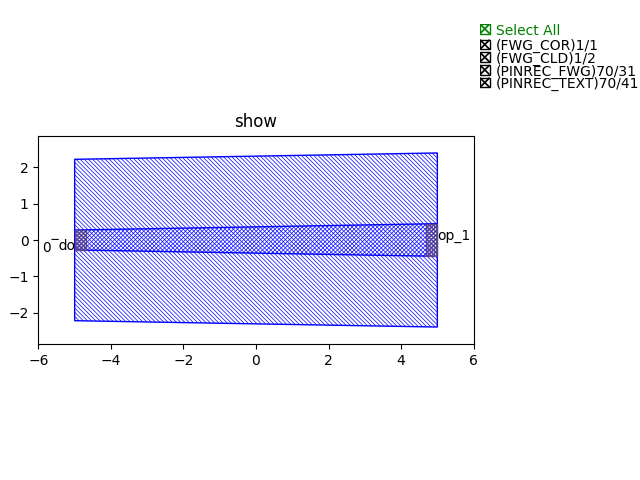
Run the complete script once, generating the following GDS layout.
Section Script Description
Import function packages:
To customize the basic components(straight waveguide/bends) in gpdk, several packages needs to be imported.
cached_property,Tupleare for data processing.fnpcell,get_technology,CoreCladdingWaveguideType,Extendedare for process information, data format , routing function, etc:from functools import cached_property from pathlib import Path from typing import Optional, Tuple from fnpcell import all as fp from gpdk.technology import get_technology from gpdk.technology.interfaces import CoreCladdingWaveguideType
Define a new PCell, and a custom class (here will be
TaperLinear):Inherit the new PCell via
fp.PCell&fp.IWaveguideLikein fnpcell, which is a new basic component in gpdk.fp.IWaveguideLikeis the parent class of all basic components infnpcell, and it includes the base setting of the components.class TaperLinear(fp.IWaveguideLike, fp.PCell):
Define the properties and methods in the
TaperLinearclassDefine user-definable parameters:
length: float = fp.PositiveFloatParam(default=10) left_type: CoreCladdingWaveguideType = fp.WaveguideTypeParam(type=CoreCladdingWaveguideType) right_type: CoreCladdingWaveguideType = fp.WaveguideTypeParam(type=CoreCladdingWaveguideType) anchor: fp.Anchor = fp.AnchorParam(default=fp.Anchor.CENTER) port_names: fp.IPortOptions = fp.PortOptionsParam(count=2, default=["op_0", "op_1"])
length: float = fp.PositiveFloatParam(default=10)defines the length of the linear taper, and here we ser default length to 10.left_typeandright_typedefine the waveguide types of the waveguide that the taper will be connected.anchoris used to set the placement of the PCell,fp.Anchor.CENTERmeans that the center of the PCell will located in (0, 0).port_names: fp.IPortOptions = fp.PortOptionsParam()is used to define the number of ports of the component, since it is a bend, so there will be one port on the left and another on the right, the total number iscount=2. Secondly, the ports are named, and the default isdefault=("op_0", "op_1"), the user can set it by himself.
Create the
TaperLinearCreate the taper by generating the line via
fp.g.Line, where the user-defined parameters are used in the curve.@cached_propertyis a decorator that converts a class method into a property whose value is calculated only once and then cached like a regular attribute@cached_property def raw_curve(self): return fp.g.Line( length=self.length, anchor=self.anchor, )
Define the build method to build
TaperLinearInstances, elements and ports are usually used in device cells, i.e. calls to other cell instances, graphics in this cell and device ports.
The three elements in the device are implemented in the PCell definition by calling the build function module in the parent class PCell.
def build(self) -> Tuple[fp.InstanceSet, fp.ElementSet, fp.PortSet]: insts, elems, ports = super().build()
Check the waveguide type of
left_typeandright_typehas to be isomorphic before building the PCell.
assert self.left_type.is_isomorphic_to(self.right_type), "left_type must be isomorphic to right_type"
Create the taper geometry by
tapered.waveguide_type.taperedis a function to generate taper of the waveguide type.
wgt = self.left_type.tapered(taper_function=fp.TaperFunction.LINEAR, final_type=self.right_type)
Define the type of waveguide used in the taper, as well as the curve and add the ports generated from the above script.
wg = wgt(curve=self.raw_curve).with_ports(self.port_names)
Initiate wg and ports and return the instances, elements, and ports in the component cell.
insts += wg ports += wg.ports return insts, elems, ports
Use the
TaperLinearclass to create component cells and output the layoutImport the package to generate output layout file under the same file of the
TaperLinear
from gpdk.util.path import local_output_file
Refer to the path where the top generated gds file is saved. Then obtain all device process information.
gds_file = local_output_file(__file__).with_suffix(".gds") library = fp.Library() TECH = get_technology()
Create a
TaperLinearcomponent defined with default parameters
library += TaperLinear()
Export GDS files
fp.export_gds(library, file=gds_file)
Extension of the taper ports
In some cases the ports would have to be extended for several nanometers, here we provide an option for the users to extend their ports without many changes of the script.
Extended function.
Users can find the definition of
Extendedfunction ingpdk >> routing >> extended.py. Simply to say, it allow designers automatically add extension (rectangles) next to the ports of the PCell(device).The below scripts shows if user need extra 500 nm extension to each ports in this
TaperLinearcase.wgt = self.left_type.tapered(taper_function=fp.TaperFunction.LINEAR, final_type=self.right_type) wg = wgt(curve=self.raw_curve).with_ports(self.port_names) wg_extended = Extended(device=wg,lengths={"*":0.5}) insts += wg_extended ports += wg_extended.ports
Length of each extended ports can be defined themselves e.g.
lengths={"op_0":1, "op_1":2, "*":0.5}."*"means all of the undefined ports.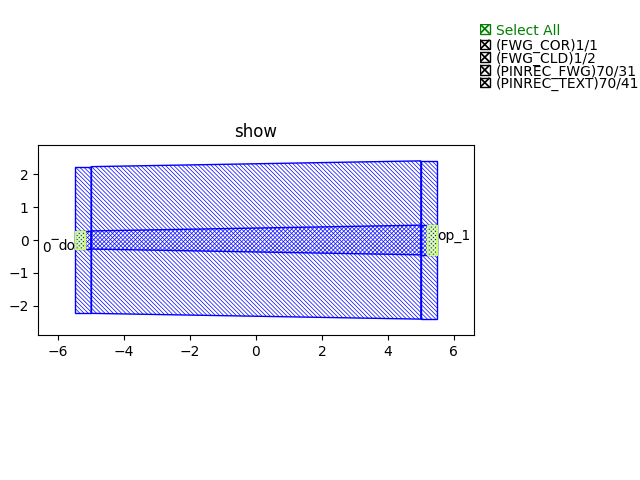
Note
For auto-routing applications e.g.
straight,bend,taper,transition, they must define araw_curvein advance to allow PhotoCAD calculate the length of the PCell and use it into auto-route function. In this case, designers has to first define araw_curveto generate the waveguide, then overlay theraw_curveto the extended taper.:@property def raw_curve(self): IN, OUT = self.cell.ports return fp.g.LineBetween(IN.position, OUT.position)