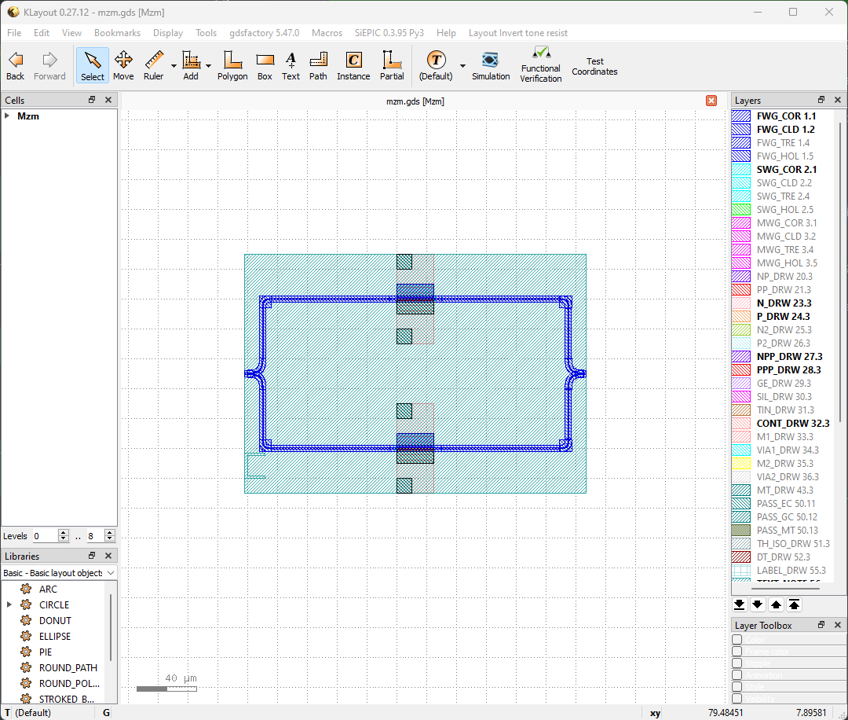
Mach-Zehnder modulator
This section will introduce customizing the components in gpdk from the beginning, using Mach-Zehnder modulator as an example. The full script can be found in gpdk > components > mzm > mzm.py.
Full Script
from typing import Tuple

from fnpcell import all as fp
from gpdk.components.combiner.y_combiner import YCombiner
from gpdk.components.pn_phase_shifter.pn_phase_shifter import PnPhaseShifter
from gpdk.components.splitter.y_splitter import YSplitter
from gpdk.technology import WG, get_technology


class Mzm(fp.PCell, band="C"):

    p_width: float = fp.PositiveFloatParam(default=1)
    n_width: float = fp.PositiveFloatParam(default=1)
    np_offset: float = fp.FloatParam(default=0)
    wg_length: float = fp.PositiveFloatParam(default=25)
    phase_shifter_spacing: float = fp.PositiveFloatParam(default=100)
    splitter_wg_length: float = fp.FloatParam(default=100)
    waveguide_type: WG.FWG.C = fp.WaveguideTypeParam(type=WG.FWG.C)
    pn_phase_shifter_0: fp.IDevice = fp.DeviceParam(type=PnPhaseShifter, port_count=2, pin_count=2, required=False)
    pn_phase_shifter_1: fp.IDevice = fp.DeviceParam(type=PnPhaseShifter, port_count=2, pin_count=2, required=False)
    y_splitter: fp.IDevice = fp.DeviceParam(type=YSplitter, port_count=3, required=False)
    y_combiner: fp.IDevice = fp.DeviceParam(type=YCombiner, port_count=3, required=False)
    port_names: fp.IPortOptions = fp.PortOptionsParam(count=2, default=["op_0", "op_1"])

    def _default_waveguide_type(self):
        return get_technology().WG.FWG.C.WIRE

    def _default_pn_phase_shifter_0(self):
        return PnPhaseShifter(
            name="p1", p_width=self.p_width, n_width=self.n_width, np_offset=self.np_offset, wg_length=self.wg_length, waveguide_type=self.waveguide_type
        )

    def _default_pn_phase_shifter_1(self):
        return PnPhaseShifter(
            name="p2",
            p_width=self.p_width,
            n_width=self.n_width,
            np_offset=self.np_offset,
            wg_length=self.wg_length,
            waveguide_type=self.waveguide_type,
            transform=fp.translate(0, -self.phase_shifter_spacing),
        )

    def _default_y_splitter(self):
        return YSplitter(
            name="s", bend_radius=10, waveguide_type=self.waveguide_type, transform=fp.translate(-self.splitter_wg_length, -self.phase_shifter_spacing / 2)
        )

    def _default_y_combiner(self):
        return YCombiner(
            name="d",
            bend_radius=10,
            waveguide_type=self.waveguide_type,
            transform=fp.translate(self.wg_length + self.splitter_wg_length, -self.phase_shifter_spacing / 2),
        )

    def build(self):
        insts, elems, ports = super().build()
        # fmt: off

        waveguide_type = self.waveguide_type
        pn_phase_shifter_0 = self.pn_phase_shifter_0
        pn_phase_shifter_1 = self.pn_phase_shifter_1
        ysplitter = self.y_splitter
        ycombiner = self.y_combiner
        port_names = self.port_names

        phase_shifter_top = pn_phase_shifter_0
        phase_shifter_bottom = pn_phase_shifter_1
        splitter = ysplitter
        ports += splitter["op_0"].with_name(port_names[0])
        ycombiner = ycombiner
        ports += ycombiner["op_2"].with_name(port_names[1])

        insts += fp.Linked(
            link_type=waveguide_type,
            links=[
                splitter["op_2"] >> phase_shifter_top["op_0"],
                splitter["op_1"] >> phase_shifter_bottom["op_0"],
                phase_shifter_top["op_1"] >> ycombiner["op_0"],
                phase_shifter_bottom["op_1"] >> ycombiner["op_1"],
            ],
            ports=[],
        )

        # fmt: on
        return insts, elems, ports


if __name__ == "__main__":
    from gpdk.util.path import local_output_file

    gds_file = local_output_file(__file__).with_suffix(".gds")
    library = fp.Library()

    TECH = get_technology()
    # =============================================================
    # fmt: off

    library += Mzm()

    # fmt: on
    # =============================================================
    fp.export_gds(library, file=gds_file)
    fp.plot(library)
Section Script Description
Importing necessary function packages
To customize the components in gpdk,
fnpcell,typingneed to be imported because modules such as data format, graphics generation, data processing need to be used.YCombiner,PnPhaseShifter,YSplitterare the PCells already generated in the previous section and we will use it as a cell to build up the mzm in this example. Moreover, graphics in the component layout need to be generated on different process layers, so process information(technology) in gpdk needs to be imported:from typing import Tuple from fnpcell import all as fp from gpdk.components.combiner.y_combiner import YCombiner from gpdk.components.pn_phase_shifter.pn_phase_shifter import PnPhaseShifter from gpdk.components.splitter.y_splitter import YSplitter from gpdk.technology import WG, get_technology
Define a new PCell, and a custom Mzm class:
Define the new parameterized cell via
fp.PCellin fnpcell, which is a new component in gpdk.band=Ccreates aCmarker on the layout for users to recognize the band using in this component and is restricted to only useC-bandwaveguides in this example.class Mzm(fp.PCell, band="C"):
Define the properties and methods in the
MzmclassDefine user-definable parameters:
p_width: float = fp.PositiveFloatParam(default=1)
n_width: float = fp.PositiveFloatParam(default=1)
np_offset: float = fp.FloatParam(default=0)
wg_length: float = fp.PositiveFloatParam(default=25)
phase_shifter_spacing: float = fp.PositiveFloatParam(default=100)
splitter_wg_length: float = fp.FloatParam(default=100)
waveguide_type: WG.FWG.C = fp.WaveguideTypeParam(type=WG.FWG.C)
pn_phase_shifter_0: fp.IDevice = fp.DeviceParam(type=PnPhaseShifter, port_count=2, pin_count=2, required=False)
pn_phase_shifter_1: fp.IDevice = fp.DeviceParam(type=PnPhaseShifter, port_count=2, pin_count=2, required=False)
y_splitter: fp.IDevice = fp.DeviceParam(type=YSplitter, port_count=3, required=False)
y_combiner: fp.IDevice = fp.DeviceParam(type=YCombiner, port_count=3, required=False)
port_names: fp.IPortOptions = fp.PortOptionsParam(count=2, default=["op_0", "op_1"])
p_width,n_width, andnp_offsetare parameters which can be set inPnPhaseShifter.wg_length,phase_shifter_spacing, andsplitter_wg_lengthdefine the geometry of the mzm, which is shown in the below figure.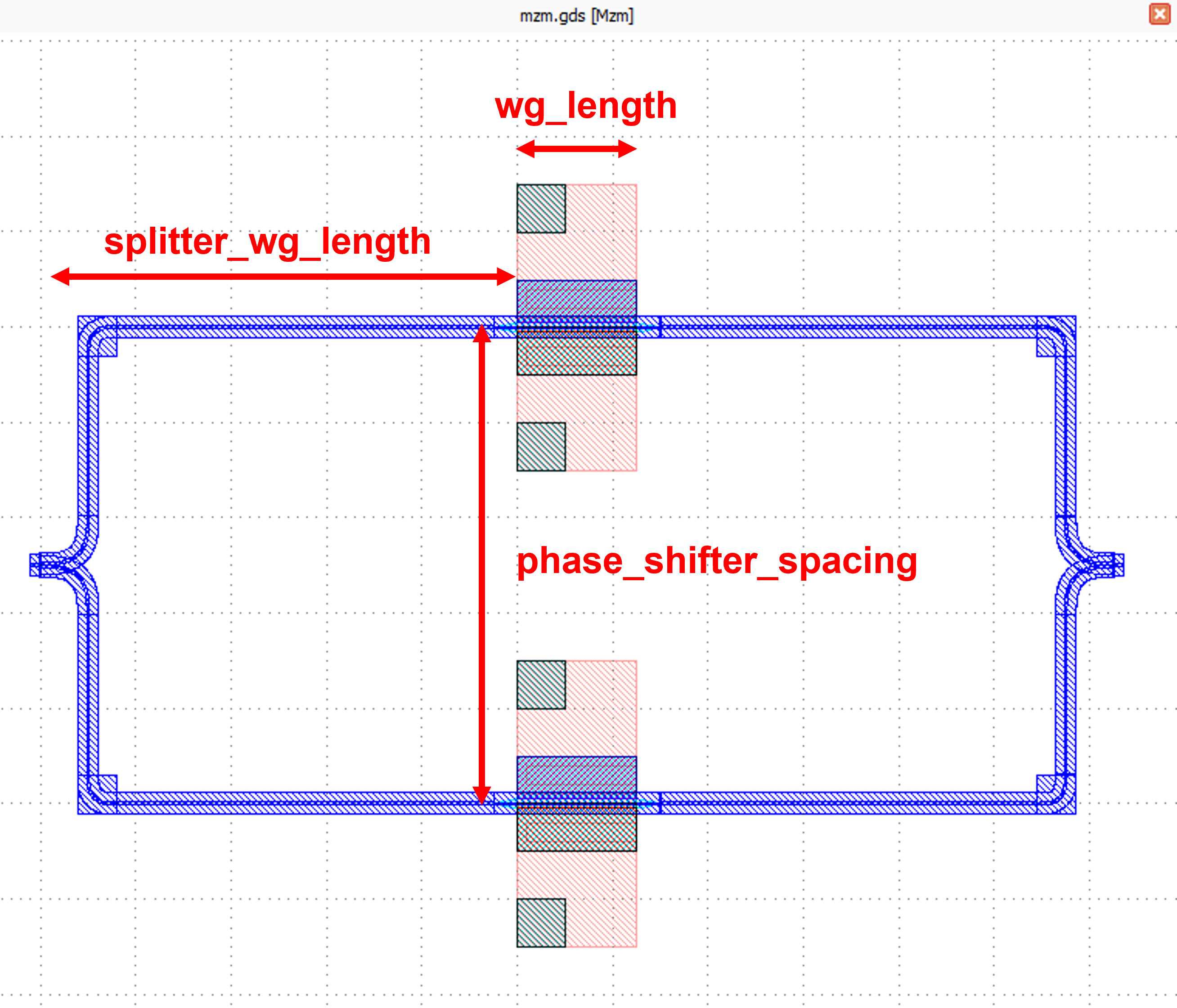
waveguide_typeis used to define the type of waveguide used in the mzm. In this example the waveguide type is limited toWG.FWG.Cbecause the mzm is operating in C-band wavelength.pn_phase_shifter_0.pn_phase_shifter_1,y_splitter, andy_combinerare used to build up the mzm component.Note
To set the type of the existing cells or Pcells in the parameter of a component, users are able to use either
fp.IDeviceorfp.Pcell. However, we recommend to usefp.IDeviceinstead offp.PcellsincePcell(child class) is inherited fromIDevice(parent class), and there would be some situation that the cell we are calling is not aPCell.For example, a cell created by
fp.Deviceis not aPcell.device = fp.Device(name='test', contents=[], ports=[],)will return adevicecell with the components in the contents and also provide the port information of the cell.:straight = Straight(length=10, waveguide_type=get_technology().WG.FWG.C.WIRE).translated(tx=-10, ty=-5) bend = SBendCircular() device = fp.Device( content=[straight,bend], ports=[straight["op_0"].with_name("op_0"), bend["op_1"]], )
The layout of the
deviceis shown in the below figure.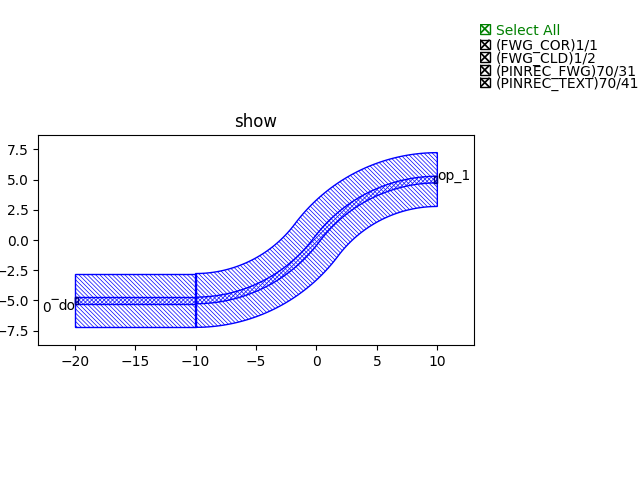
port_namesis used to define the number of ports of the component. Secondly, the ports are named, and the default isdefault=("op_0", "op_1"), the user can set it by himself.
Define a self method to get the default waveguide type and default basic components(
pn_phase_shifter,y_splitter,y_combiner):def _default_waveguide_type(self): return get_technology().WG.FWG.C.WIRE def _default_pn_phase_shifter_0(self): return PnPhaseShifter( name="p1", p_width=self.p_width, n_width=self.n_width, np_offset=self.np_offset, wg_length=self.wg_length, waveguide_type=self.waveguide_type ) def _default_pn_phase_shifter_1(self): return PnPhaseShifter( name="p2", p_width=self.p_width, n_width=self.n_width, np_offset=self.np_offset, wg_length=self.wg_length, waveguide_type=self.waveguide_type, transform=fp.translate(0, -self.phase_shifter_spacing), ) def _default_y_splitter(self): return YSplitter( name="s", bend_radius=10, waveguide_type=self.waveguide_type, transform=fp.translate(-self.splitter_wg_length, -self.phase_shifter_spacing / 2) ) def _default_y_combiner(self): return YCombiner( name="d", bend_radius=10, waveguide_type=self.waveguide_type, transform=fp.translate(self.wg_length + self.splitter_wg_length, -self.phase_shifter_spacing / 2), )
Define the build method to build
Splitterand draw the layout.Instances, elements and ports are usually used in device cells, i.e. calls to other cell instances, graphics in this cell and device ports.
The three elements in the device are implemented in the PCell definition by calling the build function module in the parent class PCell.:
def build(self):
insts, elems, ports = super().build()
Define the variable parameters and components we set.:
waveguide_type = self.waveguide_type
pn_phase_shifter_0 = self.pn_phase_shifter_0
pn_phase_shifter_1 = self.pn_phase_shifter_1
ysplitter = self.y_splitter
ycombiner = self.y_combiner
port_names = self.port_names
Add ports for the mzm from
ysplitterandycombiner.:phase_shifter_top = pn_phase_shifter_0 phase_shifter_bottom = pn_phase_shifter_1 splitter = ysplitter ports += splitter["op_0"].with_name(port_names[0]) ycombiner = ycombiner ports += ycombiner["op_2"].with_name(port_names[1])
Link all components with defined waveguide type and initiate the linked route.:
insts += fp.Linked(
    link_type=waveguide_type,
    links=[
        splitter["op_2"] >> phase_shifter_top["op_0"],
        splitter["op_1"] >> phase_shifter_bottom["op_0"],
        phase_shifter_top["op_1"] >> ycombiner["op_0"],
        phase_shifter_bottom["op_1"] >> ycombiner["op_1"],
    ],
    ports=[],
)
Return the instances, elements, and ports in the component cell.
return insts, elems, ports
Use the
Mzmclass to create component cells and output the layout.Import the package to generate output layout file under the same file of the
mzm.:from gpdk.util.path import local_output_file
Refer to the path where the top generated gds file is saved. Then obtain all device process information.:
gds_file = local_output_file(__file__).with_suffix(".gds")
library = fp.Library()
TECH = get_technology()
Create a
Mzmcomponent defined with default parameters
library += Mzm()
Export GDS files
fp.export_gds(library, file=gds_file)
Export GDS Layout
Run mzm.py and use layout tool e.g. KLayout to view the generated GDS file, which should be saved under gpdk > components > mzm > local.