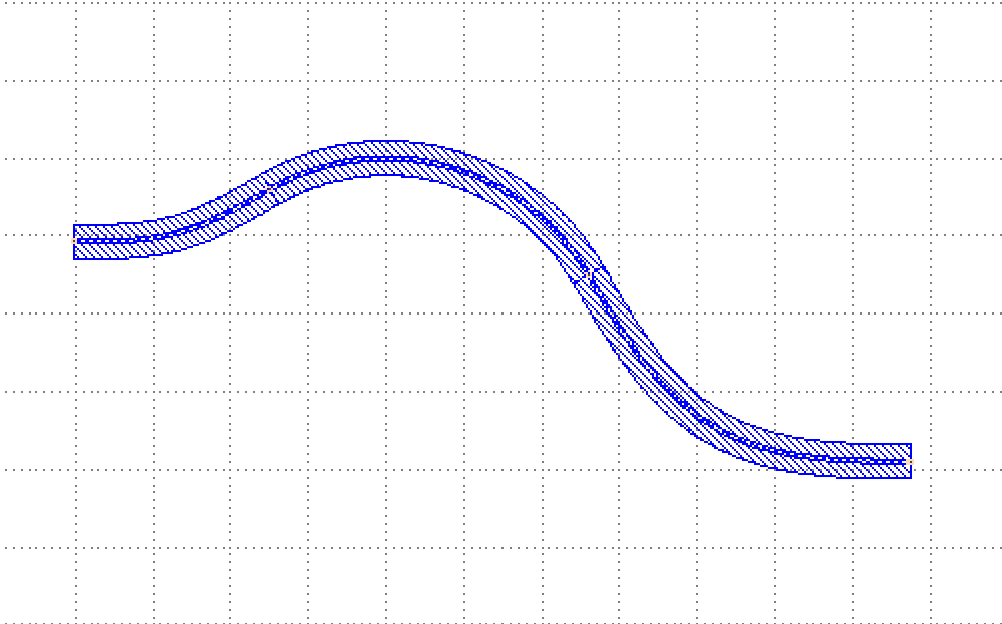
Horizontalization of device ports
In the case where the device port needs to be kept horizontal, you can use the Horizontalized class to achieve the horizontalization of the device port, the specific schematic of this function definition is given in gpdk>``routing``>``horizontalized.py``, please refer to the explanatory notes in the horizontalized.py script, the core usage of which is as follows.
Horizontalized
Full script
import math
from typing import List, Optional, Tuple
from fnpcell import all as fp
from gpdk.technology import get_technology
from gpdk.util import all as util
class Horizontalized(fp.PCell):
"""
Attributes:
device: device whose ports need to be horizontalized
bend_factory: Optional, bend waveguide factory
straight_type: Optional, type of final short straight
straight_length: defaults to 0.1, length of final short straight
Examples:
```python
TECH = get_technology()
device = Horizontalized(device=BendCircular(radius=30, waveguide_type=TECH.WG.FWG.C.WIRE, transform=fp.rotate(degrees=30)))
fp.plot(device)
```

"""
device: fp.IDevice = fp.DeviceParam()
bend_factory: Optional[fp.IBendWaveguideFactory] = fp.Param(required=False)
straight_type: Optional[fp.IWaveguideType] = fp.WaveguideTypeParam(required=False)
straight_length: float = fp.PositiveFloatParam(default=0.1)
def build(self) -> Tuple[fp.InstanceSet, fp.ElementSet, fp.PortSet]:
insts, elems, ports = super().build()
TECH = get_technology()
bend_factory = self.bend_factory
straight_type = self.straight_type
straight_length = self.straight_length
PI = math.pi
HALF_PI = PI / 2
content: List[fp.IDevice] = [self.device]
for port in self.device.ports:
if isinstance(port, fp.IOwnedPort) and not port.disabled:
port_name = port.name
port_orientation = fp.normalize_angle(port.orientation)
final_orientation = None
if -HALF_PI < port_orientation < HALF_PI:
final_orientation = 0
elif HALF_PI < port_orientation < PI or -PI < port_orientation < -HALF_PI:
final_orientation = PI
if final_orientation is not None:
turning_angle = fp.normalize_angle(final_orientation - port_orientation)
if fp.is_nonzero(turning_angle):
port = util.links.bend(TECH, content, start=port, radians=turning_angle, bend_factory=bend_factory)
if straight_length is not None:
port = util.links.straight(TECH, content, start=port, length=straight_length, end_type=straight_type)
port = port.with_name(port_name)
ports += port
insts += content
return insts, elems, ports
if __name__ == "__main__":
    from gpdk.util.path import local_output_file

    gds_file = local_output_file(__file__).with_suffix(".gds")
    library = fp.Library()

    TECH = get_technology()
    # =============================================================
    # fmt: off

    from gpdk.components.bend.bend_circular import BendCircular
    from gpdk.technology.waveguide_factory import EulerBendFactory

    library += Horizontalized(device=BendCircular(radius=30, waveguide_type=TECH.WG.FWG.C.WIRE, transform=fp.rotate(degrees=30)))
    library += Horizontalized(device=BendCircular(radius=30, waveguide_type=TECH.WG.FWG.C.WIRE, transform=fp.rotate(degrees=30)), bend_factory=EulerBendFactory(radius_min=25, l_max=25, waveguide_type=TECH.WG.FWG.C.WIRE))

    # fmt: on
    # =============================================================
    fp.export_gds(library, file=gds_file)
    # fp.plot(library)
Section Script Definition
Create horizontalized components ports and export layouts
if __name__ == "__main__":
from gpdk.util.path import local_output_file
gds_file = local_output_file(__file__).with_suffix(".gds")
library = fp.Library()
TECH = get_technology()
# =============================================================
# fmt: off
from gpdk.components.bend.bend_circular import BendCircular
from gpdk.technology.waveguide_factory import EulerBendFactory
library += Horizontalized(device=BendCircular(radius=30, waveguide_type=TECH.WG.FWG.C.WIRE, transform=fp.rotate(degrees=30)))
library += Horizontalized(device=BendCircular(radius=30, waveguide_type=TECH.WG.FWG.C.WIRE, transform=fp.rotate(degrees=30)), bend_factory=EulerBendFactory(radius_min=25, l_max=25, waveguide_type=TECH.WG.FWG.C.WIRE))
# fmt: on
# =============================================================
fp.export_gds(library, file=gds_file)
# fp.plot(library)
Here, we use the Horizontalized class to horizontalize the port during the transition, where the device parameter input is used to receive the device that needs to be horizontalized, it is the device that will be horizontalized by the port.
straight_type receives the type of straight waveguide used in the horizontalization process. straight_length receives the length of the straight waveguide after horizontalization, and bend_factory receives the curve type of the waveguide. In the following figure, we can see the device after port horizontalization.
GDS Layout