Installing PhotoCAD
System Requirement
PhotoCAD is written in the Python language and needs to be used in the Python IDE, so the requirements for the hardware and software systems come from the Python IDE requirements for the hardware and software systems. The following configuration list is for reference only.
Minimum |
Recommend |
|
|---|---|---|
RAM |
4GB RAM |
16GB RAM |
CPU |
Main Stream CPU |
Multi-core CPU |
SSD |
3GB |
5GB |
Display |
1024x768 |
1920x1080 |
Operating System |
Windows 10/ macOS 10.13/ Linux with Gnome/KDE |
Latest 64-bit OS: Windows/ macOS/ Linux with Gnome/KDE |
PhotoCAD is written in Python3 and needs to run on a 64-bit operating system. It is recommended to use Python 3.8 or higher as the interpreter.
Install Python IDE and Python package
It is recommended that users use PyCharm as the IDE for PhotoCAD, which is available in the free Community Edition of PyCharm. This manual example and software interface is based on PyCharm 2022.2 (Communication Edition) for Windows 11, which can be downloaded from its official website: https://www.jetbrains.com/pycharm
Install PhotoCAD
Once Python and Pycharm are installed, you can follow the steps in the Quick Start to install and license fnpcell. After installation, we will find the completed fnpcell and gpdk packages in Lib>site-packages. fnpcell is the main package of PhotoCAD, which is used for parametric layout component scripts and layout routing scripts. gpdk is a collection of all parametric layout design scripts in PhotoCAD. It contains both component cell layout scripts and other design templates based on parametric component cells.
PhotoCAD file structure
The PhotoCAD platform installation package has the following contents:
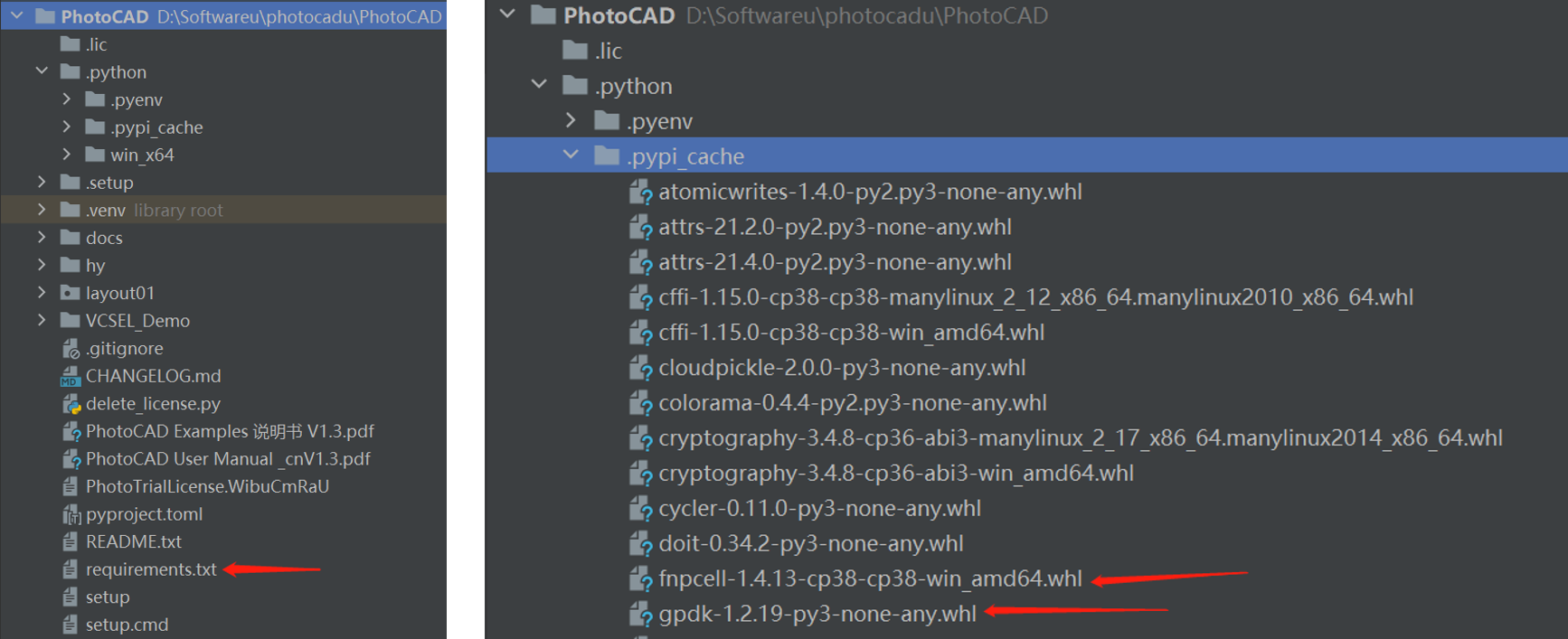
layout01: This folder is used to save project development files.
fnpcell-x.x.x-cp38-cp38-win_amd64.whl: Function module installation package in PhotoCAD.
gpdk-x.x.x-py3-none-any.whl: PCell package in PhotoCAD.
requirements.txt: Dependency package script for unified installation of PhotoCAD dependency packages.