Splitter
This section will introduce customizing the components in gpdk from the beginning, using Splitter as an example. The full script can be found in gpdk > components > splitter > y_splitter.py.
Full Script
from typing import Tuple
from fnpcell import all as fp
from gpdk.components.straight.straight import Straight
from gpdk.components.bend.bend_euler import BendEuler
from gpdk.components.taper.taper_linear import TaperLinear
from gpdk.technology import get_technology


class Splitter(fp.PCell):

    bend_radius: float = fp.PositiveFloatParam(default=15, doc="Bend radius")
    out_degrees: float = fp.DegreeParam(default=90, doc="Angle at which the waveguide exit the splitter")
    center_waveguide_length: float = fp.PositiveFloatParam(default=2.0, doc="Length of the center waveguide")
    taper_length: float = fp.PositiveFloatParam(default=0.1, doc="Length of the tapered section")
    waveguide_type: CoreCladdingWaveguideType = fp.WaveguideTypeParam(type=CoreCladdingWaveguideType)
    port_names: fp.IPortOptions = fp.PortOptionsParam(count=3, default=("op_0", "op_1", "op_2"))

    def _default_waveguide_type(self):
        return get_technology().WG.FWG.C.WIRE

    def build(self) -> Tuple[fp.InstanceSet, fp.ElementSet, fp.PortSet]:
        insts, elems, ports = super().build()

        # fmt: off

        bend_radius = self.bend_radius
        out_degrees = self.out_degrees
        center_waveguide_length = self.center_waveguide_length
        taper_length = self.taper_length
        waveguide_type = self.waveguide_type
        port_names = self.port_names

        core_width = waveguide_type.core_width


        center = Straight(length=center_waveguide_length, waveguide_type=waveguide_type, anchor=fp.Anchor.END, transform=fp.translate(-taper_length, 0))
        insts += center
        ports += center["op_0"].with_name(port_names[0])

        taper_type = waveguide_type.updated(core_layout_width=core_width * 2, cladding_layout_width=waveguide_type.cladding_width + core_width)
        taper = TaperLinear(length=taper_length, left_type=waveguide_type, right_type=taper_type, anchor=fp.Anchor.END)
        insts += taper

        bend_top = BendEuler(radius_eff=bend_radius, degrees=out_degrees, waveguide_type=waveguide_type).translated(0, core_width/2)
        insts += bend_top

        bend_bottom = bend_top.v_mirrored()
        insts += bend_bottom

        ports += bend_bottom["op_1"].with_name(port_names[1])
        ports += bend_top["op_1"].with_name(port_names[2])  # for right port index(0 1 2) in netlist

        # fmt: on
        return insts, elems, ports


if __name__ == "__main__":
    from gpdk.components import all as components
    from gpdk.util.path import local_output_file

    gds_file = local_output_file(__file__).with_suffix(".gds")
    library = fp.Library()

    TECH = get_technology()
    # =======================================================================
    # fmt: off

    library += YSplitter()

    # fmt: on
    # =============================================================
    fp.export_gds(library, file=gds_file)
    fp.export_pls(library, file=gds_file.with_suffix(".pls"), components=components)
    # fp.plot(library)
Section Script Description
Create a new python script:
For example, create a new
splitter.pyscript undergpdk>components>splitter.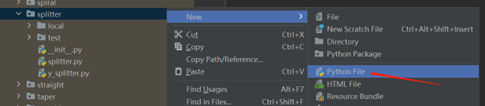
Importing necessary function packages
To customize the components in gpdk,
fnpcellneeds to be imported because modules such as data format, waveguide type(CoreCladdingWaveguideType), graphics generation need to be used. Moreover, graphics in the component layout need to be generated on different process layers, so process information(technology) in gpdk needs to be imported. The python librariestypingfor data processing also need to be imported for this:from typing import Tuple from fnpcell import all as fp from gpdk.components.straight.straight import Straight from gpdk.components.bend.bend_euler import BendEuler from gpdk.components.taper.taper_linear import TaperLinear from gpdk.technology import get_technology
Define a new PCell, and a custom Splitter class:
Define the new parameterized cell via
fp.PCellin fnpcell, which is a new component in gpdk.class Splitter(fp.PCell)
Define the properties and methods in the
SplitterclassDefine user-definable parameters:
bend_radius: float = fp.PositiveFloatParam(default=15, doc="Bend radius")
out_degrees: float = fp.DegreeParam(default=90, doc="Angle at which the waveguide exit the splitter")
center_waveguide_length: float = fp.PositiveFloatParam(default=2.0, doc="Length of the center waveguide")
taper_length: float = fp.PositiveFloatParam(default=0.1, doc="Length of the tapered section")
waveguide_type: CoreCladdingWaveguideType = fp.WaveguideTypeParam(type=CoreCladdingWaveguideType)
port_names: fp.IPortOptions = fp.PortOptionsParam(count=3, default=("op_0", "op_1", "op_2"))
In
Splitter, two mirrored bends are used, where the radius of the bend, the angle of the output waveguide, the waveguide type, and the device port are all key variables.bend_radius: float =fp.PositiveFloatParam()defines the radius of bend inSplitter, the data type is positive floating point, set the default value to 15,doc=""is used to mark the comment description text.out_degrees:float =fp.DegreeParam()is used to indicate the output angle of the Splitter, with a default value of 90 degrees.taper_length: float = fp.PositiveFloatParam()``is used to define the length of the tapered structure in ``Splitter, default is 0.1.waveguide_type: CoreCladdingWaveguideType = fp.WaveguideTypeParam()is used to define the type of the waveguide.port_names: fp.IPortOptions = fp.PortOptionsParam()is used to define the number of ports of the component, since it is a Y-shaped branch, so there will be one port on the left and two ports on the right, the total number iscount=3. Secondly, the ports are named, and the default isdefault=("op_0", "op_1", "op_2"), the user can set it by himself.
Define a self method to get the default waveguide type:
def _default_waveguide_type(self):
    return get_technology().WG.FWG.C.WIRE
If the user does not specify the waveguide type to return a waveguide of type
FWG.C.WIRE, this can be modified here to the default waveguide type specified by the user, e.g.get_technology().WG.MWG.C.WIRE.Define the build method to build
Splitterand draw the layoutInstances, elements and ports are usually used in device cells, i.e. calls to other cell instances, graphics in this cell and device ports.
The three elements in the device are implemented in the PCell definition by calling the build function module in the parent class PCell
def build(self):
    insts, elems, ports = super().build()
Define the variable parameters we set
bend_radius = self.bend_radius
out_degrees = self.out_degrees
center_waveguide_length = self.center_waveguide_length
taper_length = self.taper_length
waveguide_type = self.waveguide_type
port_names = self.port_names
Define the width of the waveguide core
core_width = waveguide_type.core_width
Define the type of curve of the intermediate waveguide, as well as its length, the type of waveguide, the starting point of the waveguide and the position of the waveguide by means of its parameters
center = Straight(length=center_waveguide_length, waveguide_type=waveguide_type, anchor=fp.Anchor.END, transform=fp.translate(-taper_length, 0))
Initiate center and define the name of the ports
insts += center
ports += center["op_0"].with_name(port_names[0])
Define the type of waveguide in the tapered part of the device and to set the width of the cores therein in relation to the width of the cladding.
taper_type = waveguide_type.updated(core_layout_width=core_width * 2, cladding_layout_width=waveguide_type.cladding_width + core_width)
Define and initiate the shape of the taper, where the parameters are used to control its length, waveguide type, starting position, etc.
taper = TaperLinear(length=taper_length, left_type=waveguide_type, right_type=taper_type, anchor=fp.Anchor.END)
insts += taper
Define and initiate the top bend an Euler-shaped bend, where the control parameters can be found in the
BendEulerclass.
bend_top = BendEuler (radius_eff=bend_radius, degrees=out_degrees, waveguide_type=waveguide_type).translated(0, core_width/2)
insts += bend_top
Define and initiate the right side lower output bend is mirrored vertically with the upper output bend in
Splitter.
bend_bottom = bend_top.v_mirrored()
insts += bend_bottom
Define the names of the two ports (
bend_top/bend_bottom) separately and initiate them.
ports += bend_bottom["op_1"].with_name(port_names[1])
ports += bend_top["op_1"].with_name(port_names[2])
Return the instances, elements, and ports in the component cell.
return insts, elems, ports
Use the
Splitterclass to create component cells and output the layoutImport the path control package for python. Since the above code uses the components defined in
gpdk, it is straightforward to import all the components for ease of use.
from pathlib import Path
import gpdk.components.all
Refer to the path where the top generated gds file is saved. Then obtain all device process information.
gds_file = Path(__file__).parent / "local" / Path(__file__).with_suffix(".gds").name
library = fp.Library()

TECH = get_technology()
Create a component defined with default parameters
library += Splitter ()
Use the variable parameters defined in our
Splitterclass to generate the specified component
library += Splitter(name='S', bend_radius=15, out_degrees=90, center_waveguide_length=4, taper_length=0.5,waveguide_type=TECH.WG.MWG.C.WIRE, port_names=(['op_a', 'op_b', 'op_c']))
Export GDS files
fp.export_gds(library, file=gds_file)
Run the script and view the layout
Run splitter.py and use layout tool e.g. KLayout to view the generated GDS file, which should be saved under gpdk > components > splitter > local.
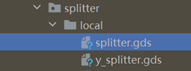
In the table you can see the two generated instances, Splitter and Splitter_S, where Splitter is set as a prefix the definition of the splitter class name. S is the instance name defined at the time of instantiation, when specified by default plus the former Splitter_.
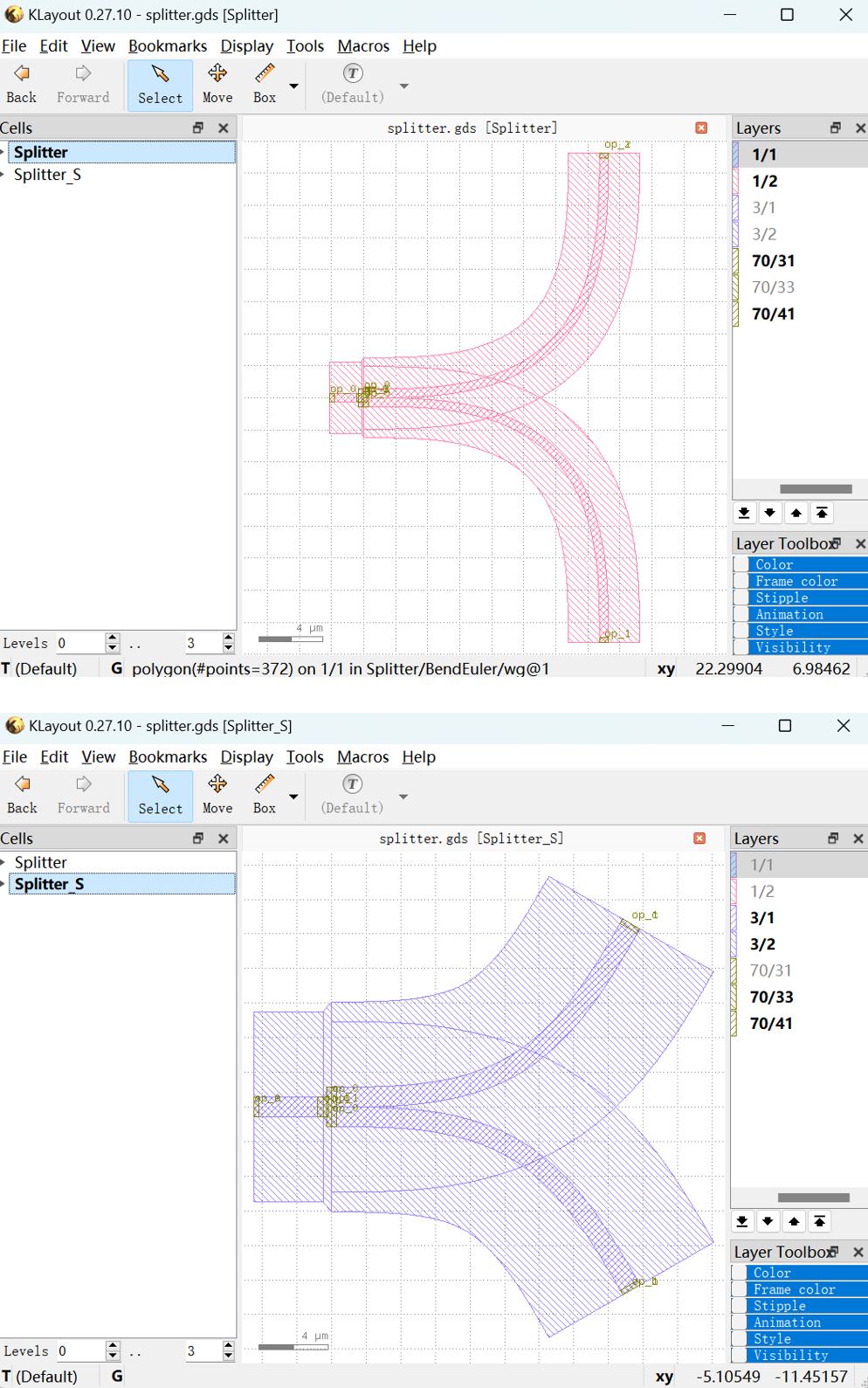
View the two layout cells separately.
Splitter: bend radius default=
15, output angle default=90, central waveguide length default=2, taper length default=0.1, waveguide type default=FWG.C.WIRE, default port nameop_1,op_2,op_3.Splitter_S: bend radius default=
20, output angle default=60, central waveguide length default=4, taper length default=0.5, waveguide type default=MWG.C.WIRE, default port nameop_a,op_b,op_c.